
Payment Fraud Is Getting Worse. Here’s How to Fight Back.
Online fraud losses have surpassed $10.5 trillion USD globally last year. Every day, merchants lose revenue not just to stolen cards but to chargebacks, penalties, and the slow erosion of customer trust.
The worst part? Most of it is preventable.
Automated fraud detection has become a baseline requirement for any serious e-commerce operation. And for merchants using Worldline payment gateway integration, that protection is already integrated. You just need to know how to use it.
Payment gateway Worldline is built with a multi-layered fraud detection engine that works in real time, learns from your transaction data, and can be customized to match your specific risk profile.
This guide breaks down exactly how Wordline’s fraud prevention for online payments works and how to configure it properly.
Why Fraud Detection Can’t Be an Afterthought
Fraud doesn’t just cost you the value of a stolen transaction. The ripple effects go much further.
The Real Cost of Fraud for Merchants
| Impact Area | What It Means for You |
| Chargeback fees | $20–$100 per dispute, regardless of outcome |
| Account risk | Too many chargebacks can freeze your processor account |
| Lost goods | Shipped products rarely come back after a dispute |
| Customer trust | 60%+ of shoppers abandon a brand after a security incident |
| Compliance risk | PCI-DSS and GDPR violations from inadequate fraud controls |
Common Fraud Scenarios Merchants Face
- Carding attacks — Fraudsters test stolen card batches with small purchases before making large ones. Without velocity checks, these slip through undetected.
- Account takeover — Credentials stolen from a data breach are used to log in and place orders using saved payment methods.
- Friendly fraud — A legitimate customer disputes a valid charge. This is harder to detect but manageable with proper transaction records and authentication logs.
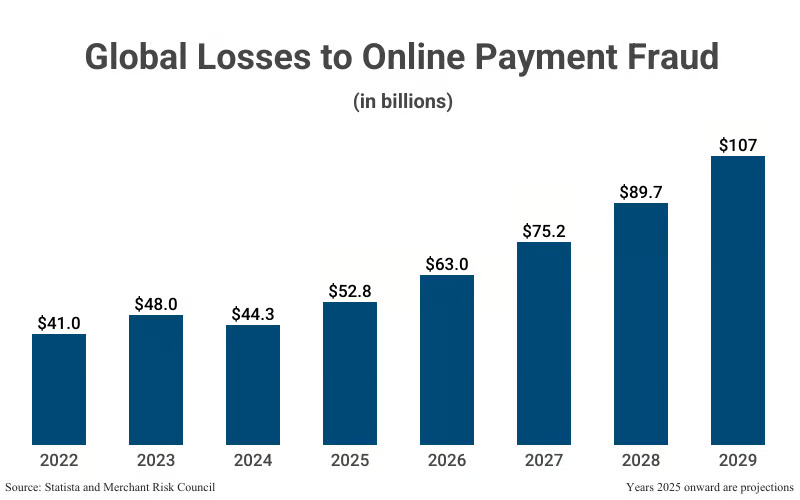
Image text: Statistics on Global Losses to Online Payment Frauds (Source)
Fraud prevention for online payments isn’t just about blocking bad actors. It’s about having enough data and controls to prove legitimacy when a dispute is filed.
How the Worldline Fraud Detection System Works?
The Worldline fraud detection system doesn’t rely on a single method. It stacks multiple detection layers, each catching what the previous one might miss.
Real-Time Transaction Monitoring
Every transaction is analyzed the moment it’s initiated. The system checks purchase amounts, timing, IP behavior, and session patterns simultaneously. If five high-value orders come from the same IP in under ten minutes, that’s flagged instantly. No manual review needed at that stage.
Risk Scoring System
Payment gateway Worldline assigns every transaction a dynamic risk score. The scoring model pulls from:
- Geographic location of the buyer
- Device and browser history
- Purchase frequency and order size
- How the transaction compares to your store’s typical profile
A returning customer buying a $40 item scores very differently from a first-time buyer in a high-risk region, placing a $900 order. Merchants control what happens at each score threshold — approve, hold for review, or block.
Rule-Based Fraud Filters
This is where merchants get hands-on control. Custom rules let you define exactly what gets flagged or blocked, no developer required. Examples:
- Block all prepaid cards on digital goods purchases
- Flag orders over $500 from specific regions
- Hold transactions where the billing and shipping addresses don’t match
The Worldline fraud detection system applies these rules before the risk score is calculated, which adds an extra filter layer.
AI and Machine Learning
Static rules are only as good as the threats you already know about. Worldline’s ML models study your historical transaction data and learn what “normal” looks like for your business specifically. Over time, they detect pattern shifts that fixed rules would miss, like a new fraud method targeting your product category.
Key Worldline Anti-Fraud Tools (And What They Actually Do)
Here’s a breakdown of the core Worldline anti-fraud tools available to merchants and the practical impact each one has.
| Worldline merchant security features | How It Works | Business Impact |
| 3D Secure (3DS2) | Adds cardholder verification via OTP or biometrics | Liability shifts from merchant to card issuer on qualifying transactions |
| Velocity Checks | Flags rapid repeated activity from the same card/IP/device | Catches carding attacks before they escalate |
| Blacklists & Whitelists | Block known bad actors; fast-track trusted customers | Reduces friction for good customers while stopping known threats |
| Device Fingerprinting | Tracks device-level attributes across sessions | Identifies fraudsters reusing the same device with different cards |
| Suspicious Transaction Alerts | Real-time notifications when risk thresholds are crossed | Keeps teams informed without constant manual monitoring |
| Automated Blocking | Instantly declines the highest-risk transactions | Protects merchants during off-hours with no manual intervention |
Secure Worldline payment processing comes from using these features in combination. A fraudster who gets past one layer will typically be caught by another.
How To Configure Worldline Payment Gateway Integration?
This is where most merchants underinvest. Worldline’s tools are powerful, but only if they’re actually set up. Here’s how to configure Worldline payment security step by step.
Step 1 — Access the Fraud Management Dashboard
Log in to your Worldline merchant portal. Navigate to Risk & Fraud or Security Settings. This is your central hub for all fraud controls within your Worldline payment gateway integration.
Step 2 — Set Transaction Thresholds
Define what triggers risk actions. A common starting point:
- Require 3DS for all orders above $150
- Flag transactions with 3+ failed payment attempts
Step 3 — Build Your Custom Rules
Use the rule builder to create filters suited to your business. Start with your highest-risk scenarios like mismatched addresses, digital goods, and cross-border orders. Expand from there.
Step 4 — Enable Alerts
Set up email or webhook notifications for flagged transactions. Your payment team shouldn’t have to check the dashboard constantly to stay informed.
Step 5 — Test Before Going Live
Worldline’s sandbox environment lets you run test transactions to confirm that rules behave as expected. This prevents legitimate customers from being incorrectly blocked. It’s a costly mistake.
Step 6 — Monitor Reports Regularly
Fraud patterns change. Use built-in reporting to track rule performance, blocked transaction rates, and chargeback trends. Adjust rules when you spot gaps.
Best Practices to Keep Fraud Protection Sharp
Configuration is a starting point. Keeping secure Worldline payment processing effective is an ongoing process.
Don’t over-tighten your rules.
Aggressive rules cause false positives. Your real customers’ transactions will get declined. Track your false decline rate monthly. A blocked legitimate sale is still lost revenue.
Review reports weekly, not quarterly.
Fraud tactics shift fast. Waiting too long to review means new attack patterns go undetected until they’ve already done damage.
Update rule sets as your business grows.
Your transaction profile changes as you scale. Rules built for a $50K/month store may not work correctly at $500K/month.
Cross-train your team.
Automated systems handle volume. Humans handle edge cases. Make sure your payment team understands how to read risk scores and when to escalate a manual review.
Layer your defenses.
Use automated blocking for obvious threats and manual review for borderline cases. Combining both gives you coverage without sacrificing customer experience.
Real-World Use Case: From Chargeback Spike to Recovery
The situation: A mid-sized U.S. electronics merchant saw chargebacks climb from 0.4% to 1.8% of total transactions over 90 days. Investigation revealed a coordinated carding attack: fraudsters testing stolen cards with small purchases before escalating to high-value orders.
What they configured using Worldline transaction risk management:
- Velocity checks flagged any card with 2+ declines within 10 minutes
- Device fingerprinting identified repeat offenders switching card numbers from the same device
- A custom rule blocked orders over $200 from IPs with prior declined transactions
- 3DS authentication was enabled for all orders above $150
Results after 30 days:
| Metric | Before | After |
| Chargeback rate | 1.8% | 0.3% |
| Fraud attempt volume | Baseline | Down 73% |
| Estimated losses avoided | — | ~$18,000 |
| False decline rate | Low | Unchanged |
The key wasn’t using all Worldline merchant security features available. It was configuring the right features for the specific attack pattern they were facing.
Conclusion: Set It Up Before Fraud Forces You To
Fraud doesn’t give advance warning. Merchants who treat detection as an afterthought pay for it in chargebacks, penalties, and customer trust that’s hard to rebuild.
Payment gateway Worldline gives you the tools to stay ahead of it. Real-time monitoring. Risk scoring. Custom rules. AI-driven pattern detection. It’s all there. But it only works if you properly configure Worldline payment security and maintain it actively.
Secure your payments today! Activate Worldline’s fraud protection features with Elsner’s Worldline plugin before fraud costs your business. Start with 3D Secure and velocity checks. Build your custom rules. Set up alerts. Then review, refine, and repeat.
Frequently Asked Questions
How does Worldline detect fraudulent transactions?
It uses a combination of real-time monitoring, machine learning, behavioral risk scoring and custom merchant rules. All these security features run simultaneously on every transaction.
Is Worldline payment gateway secure?
Yes. Worldline is PCI-DSS Level 1 certified and uses multi-layer encryption and authentication across all transactions.
Can merchants customize Worldline fraud rules?
Yes with professional Worldline payment protection setup. The rule builder lets merchants create and modify rules directly in the dashboard, no developer support required.
Does Worldline support 3D Secure?
Yes, both 3DS1 and 3DS2. 3DS2 is the current standard and supports biometric authentication with less checkout friction.
How do I reduce chargebacks with Worldline?
Enable velocity checks, 3D Secure, and device fingerprinting. Review fraud reports regularly and update rules as attack patterns evolve.
Data Source: Cybercrime To Cost The World $10.5 Trillion Annually By 2025